

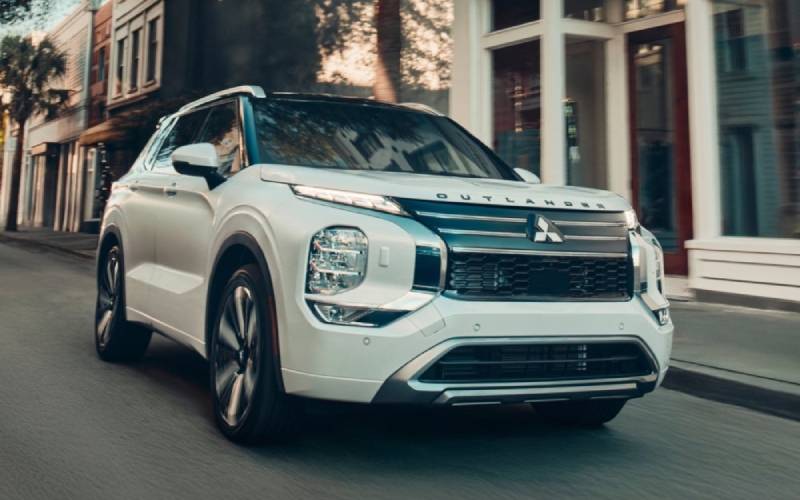
Reading Mitsubishi - Parking Made Simple around Reading, PA with the 2026 Mitsubishi Outlander’s Multi-View Camera
Parallel spots along Penn Street, tight garages near the Santander Arena, or quick pickups on busy downtown blocks—parking around Reading, PA can test your patience. The 2026 Mitsubishi Outlander takes the stress out of everyday maneuvering with an available 360° Multi-View Camera System, intelligent sensors, and a clear, high-resolution 12.3-inch display that is standard on every Outlander. This blog unpacks how those features work together to simplify low-speed driving, protect wheels and bumpers, and help you park with first-try confidence.
How the Multi-View Camera System Works for You
The Multi-View Camera System stitches images from multiple cameras around the vehicle to create a composite bird’s-eye view. As you pull into a space, you can see curbs, lines, and obstacles that would otherwise sit outside your mirrors. Combine that with front and rear camera views and on-screen guidelines, and it becomes much easier to angle the Outlander precisely—especially in those tight Reading garages where inches matter.
For drivers who navigate dense parking near the Reading Hospital or Reading Public Museum, this extra clarity is more than convenient. It helps reduce the guessing game that often leads to door dings, scuffed wheels, or time-consuming re-park attempts. You can even toggle views to focus on what matters most in the moment—front corners near low bollards, rear corners while backing toward a curb, or the full overhead view to check spacing at a glance.
Why Outlander’s Display and Sensors Make the Difference
Crucially, the Outlander’s standard 12.3-inch Smartphone-link Display Audio with Navigation provides a generous canvas for those camera feeds. Detail pops on the large screen, making it easier to read distance and trajectory in real time. Parking sensors add audible alerts to your visual cues, so you get layered feedback as you approach obstacles or nearby vehicles. In practice, you find yourself making smoother, more confident inputs with fewer stops and reversals.
Pair the camera system with the Outlander’s tidy turning circle and electric power steering, and low-speed maneuvering becomes intuitive. Whether you are sliding into a parallel spot near a coffee run on Penn Street or easing into a narrow townhouse driveway, you can rely on technology that pays attention right alongside you. The end result is less stress, less time circling the block, and a better chance that your front wheels avoid meeting the curb.
Everyday Tech That Works Beyond Parking
While the Multi-View Camera System shines in garages and lots, the Outlander’s broader tech story supports more of your day. Wireless Apple CarPlay® and Android Auto™ are standard across the lineup, cutting down on clutter and speeding up your routine. The available Dynamic Sound Yamaha® Ultimate system deepens your commute with twelve precisely tuned speakers and dual amplifiers—perfect for audio that keeps you focused during the morning rush on Route 12 or 222.
Safety also runs quietly in the background. Standard Forward Collision Mitigation with Pedestrian Detection, Blind Spot Warning with Lane Change Assist, and Rear Automatic Emergency Braking help you relax into the drive. Available MI-PILOT Assist with Navi-link can further reduce the burden in traffic by helping manage speed, lane centering, and stop-and-go movement. Combine those layers of assistance with the camera system, and urban mobility feels more fluid than ever.
Tips for Making the Most of Your Camera System
- Engage the overhead view before you commit to a spot to assess lines and obstacles
- Use corner views to protect wheels and bumpers near tall curbs or low posts
- Follow on-screen trajectory lines as you steer to check path accuracy
- Rely on audible sensor alerts as a second layer of feedback in tight areas
- Switch to rear view early when backing to confirm the space is clear
These simple habits quickly become second nature, and you will notice how much smoother each parking maneuver feels. The goal is not just avoiding scrapes—it is saving time and keeping your day moving without extra laps around the block.
Frequently Asked Questions:
Is the Multi-View Camera System standard on every 2026 Outlander?
The Multi-View Camera System is available and standard on select trims. Every Outlander includes a standard rearview camera to support daily parking.
Does the camera system work in the rain or low light?
Yes. The system is designed for everyday conditions, and the Outlander’s LED lighting helps maintain visibility in dim settings. As with any camera, very heavy rain or snow can reduce clarity.
Can I use the camera views while driving forward at low speeds?
Yes, you can access front and around-view displays at low speeds to help navigate tight driveways, ramps, and garages.
Do I need to pair my phone to use the cameras?
No phone pairing is required. Camera views appear directly on the Outlander’s 12.3-inch display when the system is engaged.
What other features help with parking and tight spaces?
In addition to the camera system, many Outlander trims include parking sensors and a power liftgate that can be adjusted for height—handy in garages with low ceilings.
At Reading Mitsubishi, we focus on practical solutions that make daily life easier, and the 2026 Outlander’s Multi-View Camera System is one of those features that delivers real value the moment you drive into town. We are serving Ephrata, Hazleton, and Reading with a knowledgeable team ready to walk you through the camera settings, safety technologies, and trim options so you can choose confidently. If you have ever circled a downtown block waiting for a perfect space, you will appreciate what this system does for your routine—less stress, better visibility, and a cleaner, quicker park in the spot you actually want.
Request more 2026 Mitsubishi Outlander information
Categories:
Mitsubishi Outlander